Google Business Profile in the UAE: Set Up, Verify and Rank on Google Maps
Set up, verify and rank your Google Business Profile in Dubai and the UAE: video verification, the flexi-desk rule, categories, reviews and quick fixes.

On this page
- The short version
- Who can have a Google Business Profile in the UAE
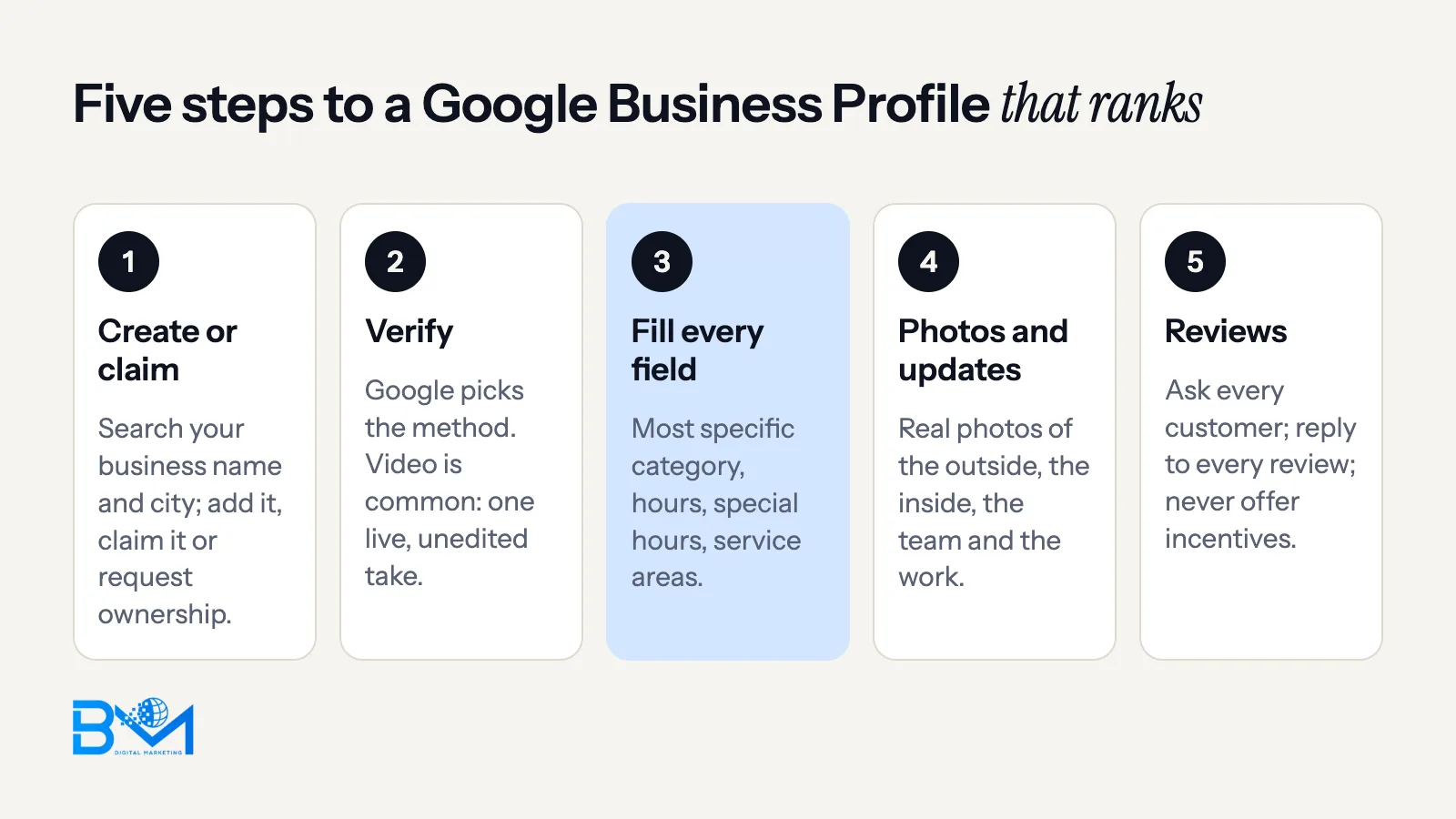
- Step 1: Create or claim your profile
- Step 2: Verify your business (usually by video)
- Step 3: Fill in every field that matters
- Step 4: Add real photos and regular updates
- Step 5: Get reviews the right way, and answer every one
- How Google decides who ranks on Google Maps
- Mistakes that get UAE profiles hidden or suspended
- Fixes for common problems
- How to check your Google Maps ranking and results
- Frequently asked questions
- Want it done for you?
- Sources
A Google Business Profile is the free listing that puts your business on Google Maps and in the map box at the top of Google Search. In the UAE, three things decide whether yours shows up: it must be verified, its details must be complete and accurate, and it needs real reviews. Google ranks these local results on relevance, distance and prominence, and it says plainly that nobody can pay for a better place.
This guide walks through each step for a business in Dubai or anywhere in the UAE: who can have a profile, how to pass video verification, what to fill in, how to get reviews without breaking Google’s rules, and what to do when something goes wrong. Every rule here comes from Google’s own help pages, checked in November 2026; the sources are listed at the end.
The short version
- Eligible: businesses that meet customers in person, either at their own premises or by going to the customer. Online-only businesses can’t have a profile.
- Flexi-desks and virtual offices: a virtual office address isn’t allowed. A co-working office counts only if it has your signage, is staffed by your team and receives customers during business hours.
- Verification: Google chooses the method. Video is the most common, and Google recommends it whenever it’s offered. Reviews take up to five business days.
- Ranking: relevance, distance and prominence. You control the first and the last; nobody controls distance.
- Reviews: ask every customer and reply to every review. Never offer a discount or gift in return for a review.
Who can have a Google Business Profile in the UAE
Google allows a profile for a business that either has a place customers can visit, or travels to customers where they are. That gives you three types:
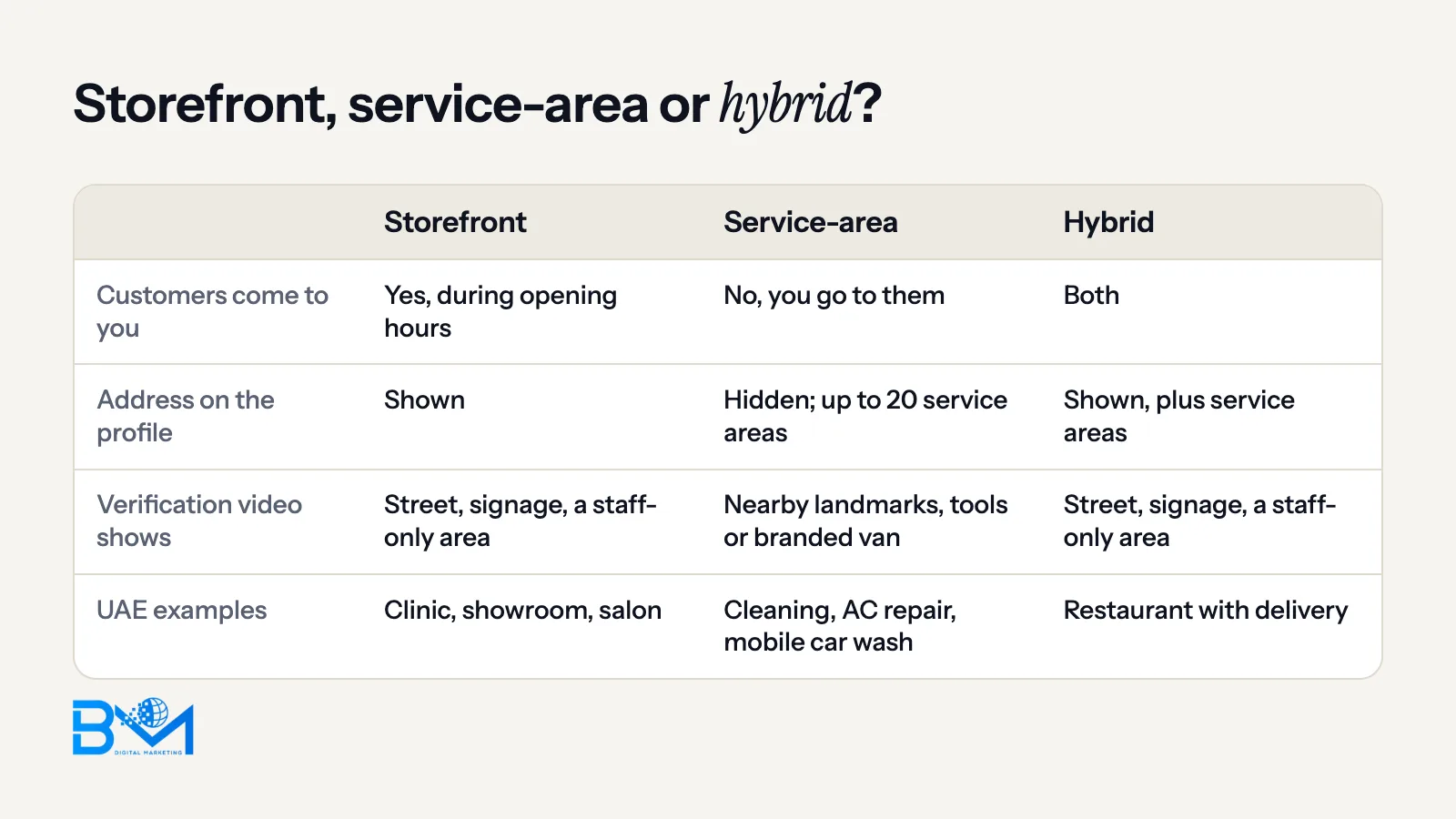
- Storefront: customers come to you during opening hours, at an address with permanent signage. A clinic, a showroom, a salon, an office that receives clients.
- Service-area business: you go to the customer and don’t serve them at your address. A cleaning company, AC repair, a mobile car wash. You hide your address and list the areas you serve instead.
- Hybrid: both. A restaurant with dine-in and delivery.
The flexi-desk question
Many UAE companies hold a licence with a flexi-desk or a shared office address. Google’s rules are clear on this. A rented address where the business doesn’t actually operate, which Google calls a virtual office, can’t have a Business Profile. An office in a co-working space can be listed only if it has clear signage, receives customers during business hours, and is staffed by your own team during those hours.
If your team goes out to customers, set the profile up as a service-area business and hide the address. If all of your work happens online and you never meet customers in person, Google’s rules don’t allow a profile. Put that effort into your website and other channels instead.
Google also allows only one profile per location. Two profiles for the same office, whether in one account or two, break that rule and cause problems with how your business shows on Maps.
Step 1: Create or claim your profile
You need a Google Account. Use one tied to a company email address, not a personal Gmail of someone who might leave. Then search Google for your business name and city. Three things can happen:
- Your business isn’t on Google: add it.
- It’s there but nobody has claimed it: claim it.
- Someone else already manages it, such as a former employee or an old agency: request ownership through Google’s ownership request process. Don’t create a second profile.
Your business name
Use your real-world name exactly as it appears on your signage, website and stationery. In the UAE, that is normally the trading name on your licence and your sign. Google doesn’t allow extra words in the name, and it can suspend a profile for them. “Al Noor Dental Clinic” is fine. “Al Noor Dental Clinic, Best Dentist in Dubai Marina, Teeth Whitening” is not. The area, the services and the category each have their own fields.
Your address
Dubai addresses don’t use postcodes, so precision matters more. Give the building name, the floor and unit number, the street and the area. Put the unit or office number in address line 2. Google accepts landmarks only where the official street address doesn’t pinpoint the business. Then check the map pin: in a tower or a large mall it often drops in the middle of the building, so drag it to the entrance customers actually use.
Step 2: Verify your business (usually by video)
Verification proves to Google that you run the business, and Google says verified profiles are more likely to show in results. You don’t choose the method; Google offers what’s available for your business type, region and details. The options include phone or text, email, a live video call, mail, and a video recording. When video is offered, Google recommends it. Sometimes you need more than one method.
How to record a video that passes
Google’s rules for the video are specific. It must be:
- Recorded live and uploaded from a phone through your Business Profile. You can’t film it earlier and upload it later.
- One unedited take with no breaks, at least 30 seconds long.
- Free of sensitive details: no bank, tax or ID numbers, no private information, and no other people’s faces.
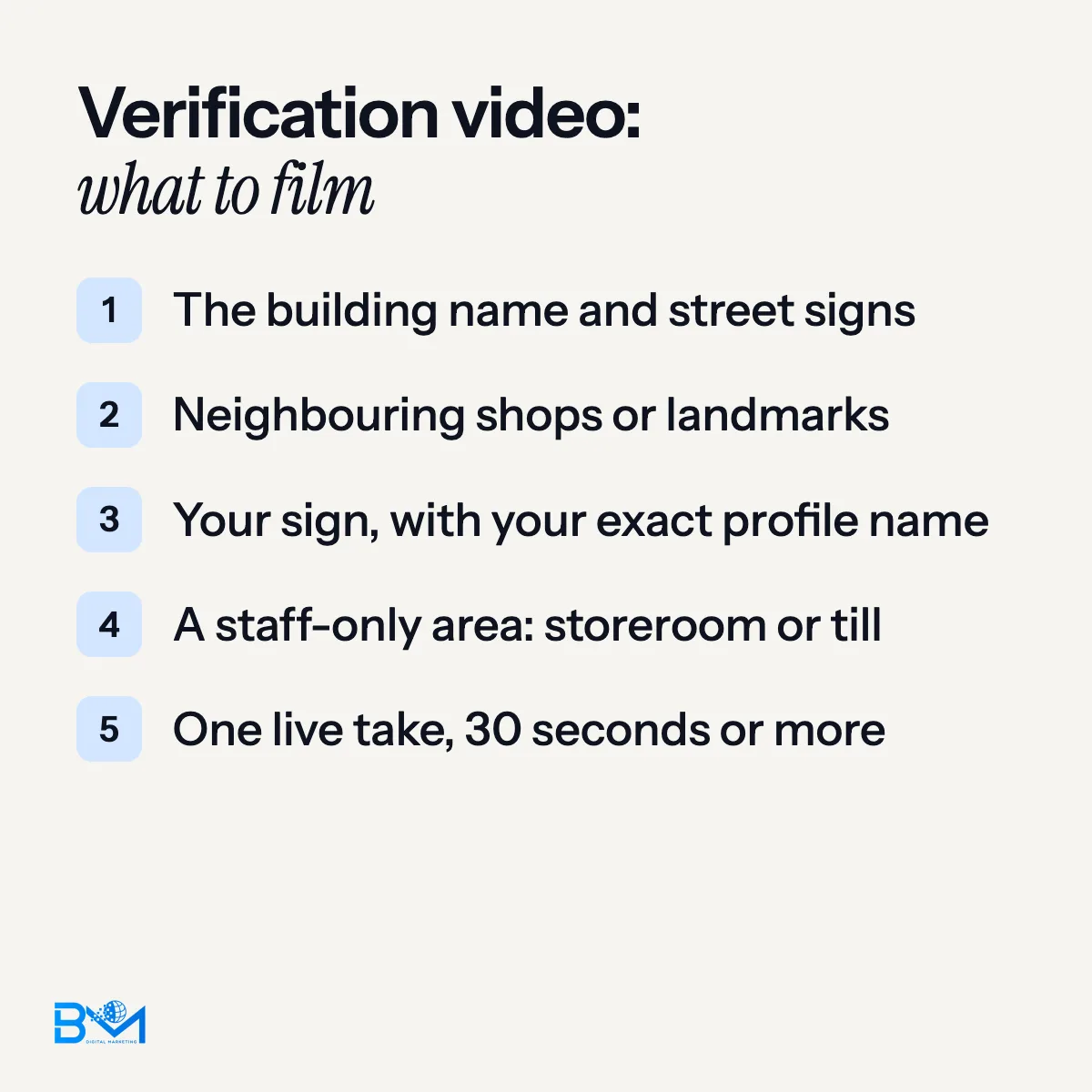
For a storefront or hybrid business, the video must show three things:
- Where you are: street signs, the building number or name, neighbouring businesses or landmarks.
- That the business exists: your signboard or a sign on a wall or window, with the name exactly as it appears on your profile.
- That you manage it: something only staff can access, such as a storeroom, the kitchen or a point-of-sale system.
In a Dubai tower, a sequence that covers all three is: the building’s name sign outside, the lobby directory, the lift to your floor, your office sign at the door, then a staff-only area. Google requires the name in your video to match the name on your profile, so check the sign at your door first.
A service-area business films landmarks and street signs near its base address instead of a storefront. It shows its tools, equipment or branded vehicle, and proves management by doing the work, unlocking a branded van, or showing a business permit, invoice or utility bill in the business’s name.
How long it takes
Google reviews a verification in up to five business days, occasionally longer. It can be instant if you have already verified your website in Google Search Console, so do that first. When verification succeeds, you get a confirmation email. If the “Get verified” button reappears or you see a “Review issues” notice, Google needs more information: fix what it flags and verify again.
Step 3: Fill in every field that matters
Google says businesses with complete and accurate information are more likely to appear in local results. These fields do the most work:
| Field | What to enter | Common mistake in the UAE |
|---|---|---|
| Primary category | The most specific category that describes your core business, for example “Dental clinic” rather than “Clinic” | Picking a broad category, or one for a service you rarely offer |
| Additional categories | As few as needed to cover your core business | Adding categories as keywords, or for a business next door |
| Hours | Regular hours, plus special hours for public holidays | Forgetting to change hours for Ramadan and Eid |
| Service areas | Up to 20 areas you really serve, within about two hours’ drive of your base | Listing every emirate from a single Dubai base |
| Phone and website | A number that reaches this location, and the page on your site about it | Sending every branch to the same homepage |
| Description | What you offer, who it’s for, and your history, written plainly | Text that isn’t about the business itself |
| Attributes | Facts such as parking, Wi-Fi and wheelchair access | Leaving them blank |
Categories matter more than most people think. Google uses them to decide which searches your profile appears for, so a pizza restaurant may also show for “restaurants” and “Italian restaurant”. Google asks you to use as few as possible, to make them as specific as possible, and not to use them as keywords.
Step 4: Add real photos and regular updates
Google lists photos and videos as one of the ways to improve your local ranking. Use real ones:
- The outside, with your sign visible. In a building with dozens of offices, this is what helps a customer find your door.
- The inside: your reception, treatment rooms or showroom.
- Your team and your work: finished projects, products, the people customers will meet.
Skip stock photos and screenshots of adverts. Post updates when you have something real to say: a new service, holiday hours, an event, a finished project. At BM we publish our own profile updates through Google’s Business Profile tools, with real photos and videos from our work.
Step 5: Get reviews the right way, and answer every one
Reviews feed the prominence part of Google’s ranking. Google says more reviews and positive ratings can help your local ranking. They also decide whether someone calls you or the business next to you on the map.
How to ask
- Ask every customer, not only the happy ones. Google notes that a mix of positive and negative reviews often looks more trustworthy.
- Make it one tap. Google gives you a review link and a QR code. Send the link on WhatsApp after a finished job or appointment, and put the QR code at your reception desk.
- Ask at the right moment: right after a good outcome, such as a delivery, a completed project or a successful appointment.
What Google doesn’t allow
Reviews must come from a genuine experience. Google prohibits:
- Offering anything in return for a review, or for changing or removing a bad one: a discount, a free service, a gift or payment.
- Paid reviews, and reviews posted from several accounts by or for one person, such as staff accounts.
- Posting reviews on a competitor’s profile to damage it.
Breaking these rules can get reviews removed and the profile restricted. A few real reviews are worth more than many fake ones.
How to reply
Reply to every review, good or bad. Keep it short, polite and specific. Thank happy customers, and answer complaints calmly with a way to resolve them offline. Customers in the UAE write in English and Arabic, so reply in the language the review was written in. Your replies are public, and future customers read them.
How Google decides who ranks on Google Maps
Google describes three factors behind local results:
- Relevance: how well your profile matches the search. Complete details and the right categories help here.
- Distance: how far you are from the person searching. If they don’t share their location, Google uses what it knows about where they are. You can’t change this, which is why a search from your own office looks better than one from Jumeirah.
- Prominence: how well known your business is. Google says this is based on information like how many websites link to you and how many reviews you have.
Your website supports all of this. Use the same name, address and phone number on the site as on the profile, give each branch its own page, and link the profile to that page. Being mentioned and linked by other sites, such as local directories, partners and the press, adds to prominence. Our guide to local listings and citations covers that part.
And again: Google says there is no way to request or pay for a better local ranking. Be wary of anyone who promises a guaranteed top spot on Maps.
Mistakes that get UAE profiles hidden or suspended
- Keywords in the business name: “Dubai”, service names or slogans that aren’t on your actual sign.
- A virtual office or flexi-desk address where you don’t receive customers.
- Duplicate profiles for the same location, often left behind by a previous agency or employee.
- Incentivised or staff reviews.
- A name in your verification video that doesn’t match the profile.
- Categories chosen as keywords rather than to describe what you do.
Fixes for common problems
- “Someone else manages this profile”: request ownership from inside Google Business Profile, rather than creating a new one.
- Verification failed or the options disappeared: follow the “Review issues” notice, fix what Google flags and verify again. Verify your website in Search Console, which can make verification instant.
- Two profiles for one location: use Google’s process for resolving duplicate profiles, and keep the one with the reviews.
- The pin is in the wrong place: edit the address and move the pin to the entrance customers use.
- An edit was rejected: Google’s help lists the reasons edits get rejected. Check that the new details match your signage and your website, then try again.
How to check your Google Maps ranking and results
Your profile’s Performance section shows how people found you and what they did: searches, calls, direction requests and website clicks. Check it every month.
To see your ranking, remember that it depends on where the searcher is standing. A search from your own office will flatter you. Search for your main service from a few different areas you serve, ideally on a phone that isn’t signed in to your business account.
Finally, follow what happens after the click. Add a tracking tag to your profile’s website link so Google Analytics shows those visits separately, and log calls and WhatsApp messages from Maps in your CRM. Ranking matters only when it turns into enquiries and booked meetings.
Frequently asked questions
Is a Google Business Profile free in the UAE?
Yes. Creating, verifying and managing a Business Profile costs nothing. You only need a Google Account.
How long does verification take?
Google reviews verifications in up to five business days, occasionally longer. If your website is already verified in Google Search Console, verification can be instant.
Can I use my flexi-desk or virtual office address?
Not a virtual office, meaning an address where you don’t operate. A co-working office qualifies only if it has your signage, is staffed by your team and receives customers during business hours. If you go to your customers, list your business as a service-area business and hide the address.
Can I add “Dubai” or my services to my business name?
Only if they are part of your real name as shown on your sign. Otherwise Google treats it as extra information, which isn’t allowed and can get the profile suspended.
How do I rank higher on Google Maps in Dubai?
Verify the profile, choose the most specific primary category, fill in every field accurately, add real photos, and build a steady flow of genuine reviews that you reply to. Keep your website’s name, address and phone number consistent with the profile. Distance from the searcher is the one factor nobody controls.
How can I check my Google Maps ranking?
Use the Performance section of your profile, and search for your main service from several areas you serve, not from your own office, because results depend on the searcher’s location.
Should I reply to negative reviews?
Yes. Reply calmly and briefly, acknowledge the problem and offer a way to sort it out. Future customers read your reply as much as the review.
Want it done for you?
BM’s local SEO team sets up, verifies and manages Google Business Profiles for businesses across Dubai and the UAE. We also link each profile to a website and a CRM, so every call and WhatsApp message from Maps is followed up. See our local SEO service, or book a meeting with us at our office.
Related reading: Local SEO in Dubai: The Key to Success · Local SEO for real estate companies in Dubai.
Sources
Google Business Profile Help, checked 23 November 2026:
- Tips to improve your local ranking on Google
- Verify your business on Google
- Verify your business with a video recording
- Guidelines for representing your business on Google
- Manage your service areas
- Manage your business category
- Tips to get more reviews
- Maps user-contributed content policy (fake engagement)
How we write. AI tools help with research and outlines. A person writes, edits and checks every article before it goes live.
Written by
Bilal Azam
Digital Marketing Manager, BM Digital Marketing
Shapes each client's marketing plan at BM: which channels to use, what to say to buyers and how the budget is split between them.